
Best pay-once System Utilities apps for Windows
Built-in Windows tools can leave gaps around backup, notes, scanning and device checks. These pay-once system utilities include Backup Pro, OpenStickies and VueScan.
Quick answer
This collection has 13 pay-once apps, priced from $7.49 to $99 one-time. 5 of them offer a free tier, including OpenStickies, Geekbench and aText. Between them they cover Windows, Linux and Mac. Backup Pro is our top pick from this list.
Last updated September 2026
Windows maintenance often needs separate tools for backup, notes, scanning and performance checks. These system utilities cover those jobs, and each app is sold as a one-time purchase.
Backup Pro saves a Windows PC before a crash. OpenStickies adds customizable sticky notes to the desktop. Geekbench measures device performance quickly and accurately. VueScan scans images from any of 7400 scanners.
aText offers a free tier for automated phrase replacement, and LumoTray offers a free tier for desktop tools.
Best pay-once System Utilities apps for Windows at a glance
| App | One-time price | Platforms | Free tier |
|---|---|---|---|
| Backup Pro | €37 one-time | Windows | No |
| OpenStickies | Free tier, $7.49 one-time | Linux, Mac, Windows | Yes |
| Default Folder X | $39.95 one-time | Windows | No |
| Geekbench | Free tier, $99 one-time | Linux, Mac, Windows | Yes |
| aText | Free tier, $29.99 one-time | Mac, Windows | Yes |
| SMBAct | €14.99 one-time | Linux, Mac, Windows | No |
| GhostVolt | $49.95 one-time | Windows | No |
| LumoTray | Free tier, $19 one-time | Windows | Yes |
| VueScan | Free tier, €24.95 one-time | Linux, Mac, Windows | Yes |
| screenMix | $12.99 one-time | Windows | No |
| Synergy | $29.99 one-time | Linux, Mac, Windows | No |
| DisplayBuddy | $18.99 one-time | Mac, Windows | No |
| TablePlus | $89 one-time | Linux, Mac, Windows | No |
Prices are one-time license fees as listed on each developer's site and may change.

Backup Pro is an essential tool for safeguarding your PC, especially when facing system failures or serious issues. It allows you to perform a complete system backup, including Windows and all installed software, ensuring you can restore everything to its exact state. Compatible with all Windows versions except Windows Home for system backups, it offers flexible options for other backups.
Ideal for users who need reliable data protection, Backup Pro also lets you save entire partitions to USB drives or external disks. Create a bootable USB to recover your system even if Windows won't start. With a one-time purchase of €37, it's a cost-effective solution for peace of mind.

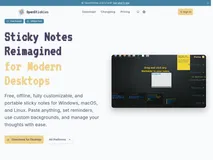
OpenStickies offers a fresh take on traditional sticky notes, providing a digital solution that is both customizable and offline-ready. With features like animated GIF backgrounds, code block support, and desktop reminders, it caters to a wide range of needs. The app is available on Windows, macOS, and Linux, ensuring a consistent experience across platforms.
Ideal for anyone looking to organize their thoughts without the clutter of traditional notes, OpenStickies is perfect for developers, creatives, and task managers. The free version is fully functional, while a one-time premium upgrade unlocks unlimited notes and reminders. This makes it a valuable tool for enhancing productivity and personalizing your digital workspace.
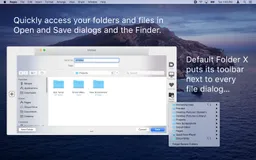
Default Folder X enhances Open and Save dialogs in all of your applications, making it easy to navigate through folders with hierarchical menus that expand as you move over them. This tool provides instant search capabilities where you can type a few characters of a file or folder name to open it quickly.
Additionally, Default Folder X integrates with Finder, letting you access all your recent and favorite items using a customizable menu. You can drag items to a dedicated drawer below Finder windows or to the menu bar icon for ultimate flexibility. Saving files is a breeze as Default Folder X remembers the last folder you used and even allows you to set default folders for specific applications.
It keeps track of recently used files and folders so you can efficiently reopen them whenever needed. System requirements: macOS 10.13 - 14.4 Navigate through folders using hierarchical pop-up menus. Search for files and folders instantly with a few keystrokes. Click on a Finder window to go directly to it in a dialog. Keep items at your fingertips by dragging them to a dedicated drawer.
Quickly access important folders using configurable keyboard shortcuts. Recall recently used folders and files with ease. Set up default folders for specific applications for quick access.
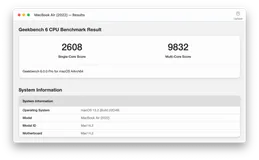
Geekbench 6 is your go-to solution for benchmarking your devices, providing you with detailed insights into their performance. Whether you are gauging CPU power for everyday tasks or testing GPU capabilities for intense gaming, image processing, or video editing, Geekbench 6 has you covered. Experience real-world tests that reflect typical usage scenarios to give you relevant, applicable results.
Geekbench 6's innovative new workloads expand into areas like Augmented Reality and Machine Learning, assuring that your system is ready for the future. Designed for comprehensive cross-platform comparisons, Geekbench 6 supports Android, iOS, macOS, Windows, and Linux. No matter the device or operating system, you can see how your devices stack up against others on the market.
Upload and share your benchmarking results through the Geekbench Browser, keeping all your data organized and easily accessible. Utilize the Benchmark Charts available on the Geekbench Browser to verify device performance using aggregated data from real users in real-world environments. Make informed decisions based on up-to-date information and truly understand your device's capabilities.
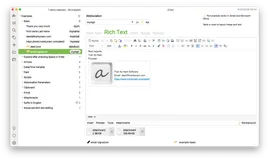
Discover an expedited way to handle your typing needs! aText is the ultimate text automation tool that simplifies your workflow by turning abbreviations into full phrases, saving you time and eliminating repetitive typing. Whether you're drafting emails, writing reports, or coding, aText seamlessly integrates into your applications to provide quick access to the text you need.
Maximize efficiency with advanced features like rich text formatting, image insertion, and auto-correction, ensuring each document is impeccably crafted with minimal effort. With cloud-sync capability, your snippets are readily available across multiple devices and platforms, fostering a harmonious multi-user environment and syncing between Windows and macOS.
Embrace a smarter way to type with aText. Tackling textual tasks is made effortless with an abundance of built-in snippets that effortlessly correct misspellings, facilitate coding, and even insert emojis. The tool's adaptability extends to working within virtual machines, remote desktop clients, and it supports an advanced configurator to tailor its function to a wide array of applications.

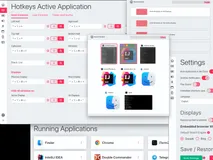
Experience the ultimate window management solution with SMBAct, designed to boost your productivity by simplifying how you interact with multiple windows and applications on your desktop. Take control of your workspace with intuitive keyboard shortcuts, and revel in the ability to cycle through different actions with repeated key presses.
Dive into a world of efficiency with SMBAct's fuzzy search capability, enabling you to swiftly activate or resize windows without the strain of remembering numerous shortcuts. With multi-display support, manage windows across several screens with ease, and keep your focus sharp by utilizing the fast and convenient window switcher feature.
Embed web pages into frameless, always-on-top windows to integrate your web workflow seamlessly into your desktop environment. Plus, take advantage of the blacklist feature to keep certain applications from interruptions while you streamline your multitasking. With a one-time purchase, gain access to all of SMBAct's powerful features, ongoing updates, and dedicated email support.
Don't miss the opportunity to transform the way you work with windows, regardless of whether you're using Windows, macOS, or Linux.

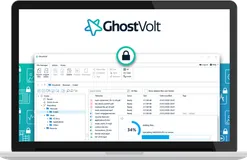
Experience ultimate data protection with GhostVolt, designed to secure your sensitive personal and business information from prying eyes and cyber threats. With advanced encryption technology, GhostVolt delivers peace of mind by making your files, data, and folders inaccessible to unauthorized users.
Its user-friendly interface allows you to maintain personal privacy, safeguard against identity theft, and comply with stringent regulations effortlessly. Whether managing personal assets like health records and tax documents or collaborating in a business environment, GhostVolt offers seamless, automated encryption protocols that integrate with platforms like OneDrive and Google Drive.
Detailed audit reporting helps meet compliance demands, while two-factor authentication adds an extra layer of security. Embrace a secure digital ecosystem where your privacy is paramount and data integrity is never compromised.
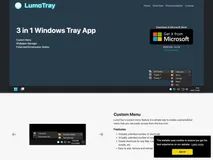
Looking for a seamless way to manage your desktop environment? LumoTray offers you the convenience of a custom menu right from your system tray, giving you instant access to a personalized array of shortcuts and folders. Tailor your menu to fit your unique needs with ease by adding, removing, and rearranging items as you wish.
Take control of your desktop aesthetic with LumoTray's innovative wallpaper manager. Whether it's for a single monitor setup or a complex multi-monitor arrangement, you can select different wallpaper configurations, including image slideshows with custom timers or daily shots from Bing or NASA's galleries. Elevate your workspace by activating LumoTray's fullscreen modes.
Utilize solid colors, images, webpages, or even live feeds like the Bing Image of the Day to transform your screens into a dynamic, visual experience. Non-intrusive options allow these modes to activate like a screensaver after a period of inactivity, without the hassle of automatic closing upon mouse movement.
Every feature is designed to integrate smoothly into your workflow, ensuring that your desktop environment is both functional and aesthetically pleasing.

Discover VueScan, the versatile scanning software that turns your obsolete scanner into a high-performance machine. Through state-of-the-art reverse engineering, VueScan liberates over 7400 different scanner models, freeing you from the constraints of discontinued drivers. Download and start scanning in seconds, with easy setup across multiple platforms including Windows and macOS.
Enjoy a suite of advanced features designed to streamline your document handling. Scan, save, and optimize your files with superior color accuracy and detail. Whether archiving a book, digitizing family photos, or preserving precious film and slides, VueScan provides professional-grade results with simplicity and efficiency.
Savor the exceptional value as customers worldwide acclaim its ease-of-use and powerful capabilities, echoing a commitment to quality scanning without the need for frequent upgrades. Embrace VueScan's regular updates and multilingual support, ensuring your scanning needs are always catered for.
With effortless integration into existing workflows and software like Photoshop, VueScan stands as the universal answer to document and image archiving and is lauded for its sustainable approach in extending the life of old scanners.

Step up your screen recording game with an ultra-useful Windows 10/11 tool that brings you the power of one-click recording and editing. Create high-quality records of your desktop, including webcam footage, system and mic audio, without any hassle. Say goodbye to complicated setups and embrace simplicity and efficiency.
ScreenMix is tailor-made for gamers, educators, and professionals seeking a seamless screen capture experience. Record your gameplay at a stunning 120 FPS, showcase your work for collaboration, or create engaging eLearning materials. With no watermarks and unlimited recording time, ScreenMix offers an uninterrupted creative process.
Benefit from a 7-day free trial and make a one-time purchase to gain everlasting access to all premium features, including free app updates. Transform your screen recordings with versatile features such as background removal for your webcam, recording delay customization, and mouse cursor visibility options, all designed to enhance your final video.
Imagine a workspace without the clutter of extra keyboards and mice, where transitioning between computers is as effortless as moving your cursor off the edge of the screen. Streamline your multi-device workflows and instantly switch control with a tool designed to enhance productivity and reclaim your desk space.
Security is paramount, so rest assured your sensitive data is protected with TLS/SSL encryption during transmission. Intuitive features like copy and paste across machines, configurable hotkeys, and adaptable screen layouts are all part of the package, enriching your multi-device interaction.
Whether for software development, creative design, education, or gaming, this application is engineered to meet your demanding multi-tasking needs. Empower yourself with a solution trusted by over 2 million users worldwide, including Fortune 500 companies.
Experience the pinnacle of convenience and efficiency with a tool that's always ready, ensuring that every switch is instantaneous, without the lag time that traditional hardware solutions impose.
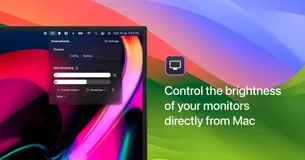
DisplayBuddy is much more than just a brightness control app for Mac. With its smart features, it allows real-time control over brightness, contrast, and volume on your external displays. Moreover, the application lets you create preset configurations for your display settings.
This means having your preferred settings saved for different times and scenarios, ready to be activated with a single click. Managing multiple displays is a breeze with DisplayBuddy as you can control all your displays from the same app. It even allows control over Apple Studio Display, Pro Display XDR, Apple Thunderbolt and iMac displays.
Creating custom keyboard shortcuts is another notable feature that makes this app extremely user-friendly. In addition to this, DisplayBuddy offers seamless compatibility with the latest Apple Silicon M1, M1 Pro, M1 Max, M1 Ultra, M2, M2 Pro, and M2 Max chips. This robust app also works with Siri and Apple Shortcuts, providing ultimate ease and convenience.


Designed for ease of use, TablePlus has a friendly and simple GUI. It provides support to a variety of relational databases including MySQL, PostgreSQL, SQLite and many others including some NoSQL databases. Its native build and simple design paired with powerful features enhance the speed and efficiency of database management.
TablePlus allows for fast and easy querying, editing, and management of databases. It has a start-up time of just half a second, ensuring swift operation. In terms of database security, TablePlus scores high with its various security features that include multi-step authentication support, native libssh, and TLS to encrypt connections.
The appearance is customizable to fit the users' personal preferences. The application also boasts of an intuitive spreadsheet-like editor that enables browsing, querying, editing of data, and database structure.
FAQ
What is the cheapest app in this collection?
OpenStickies is the cheapest option at Free tier, $7.49 one-time.
Are there free options in this collection?
Yes. OpenStickies, Geekbench, aText, LumoTray and VueScan offer a free tier, with a one-time upgrade if you need more.
Which platforms does this collection cover?
These apps run on Windows, Linux and Mac.
Do these apps require a subscription?
No. Every app on PayOnceApps is listed because it sells a one-time (perpetual) license. Some also offer a free tier or trial. Prices are checked against the developer's site but can change, so confirm on the app's website before buying.