
Best pay-once System Utilities apps for Linux
Subscriptions and web tools can be a poor fit for Linux system utilities. These pay-once apps handle input sharing, databases and scanning, including Synergy, TablePlus and VueScan.
Quick answer
This collection has 6 pay-once apps, priced from $7.49 to $99 one-time. 3 of them offer a free tier, including OpenStickies, Geekbench and VueScan. Between them they cover Linux, Mac and Windows. Synergy is our top pick from this list.
Last updated September 2026
Linux system work often spans device control, databases, notes, benchmarks, windows and scanners. These utilities cover those jobs without making the collection about subscriptions, and each app is sold as a one-time purchase.
Synergy controls multiple computers with one input set. TablePlus manages databases with a focus on easier and faster work. OpenStickies puts customizable sticky notes on the desktop. Geekbench measures device performance quickly and accurately. VueScan scans images from 7400 scanners.
OpenStickies, Geekbench and VueScan offer a free tier.
Best pay-once System Utilities apps for Linux at a glance
| App | One-time price | Platforms | Free tier |
|---|---|---|---|
| OpenStickies | Free tier, $7.49 one-time | Linux, Mac, Windows | Yes |
| Geekbench | Free tier, $99 one-time | Linux, Mac, Windows | Yes |
| SMBAct | €14.99 one-time | Linux, Mac, Windows | No |
| VueScan | Free tier, €24.95 one-time | Linux, Mac, Windows | Yes |
| Synergy | $29.99 one-time | Linux, Mac, Windows | No |
| TablePlus | $89 one-time | Linux, Mac, Windows | No |
Prices are one-time license fees as listed on each developer's site and may change.

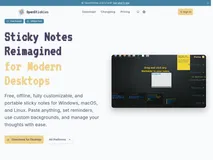
OpenStickies offers a fresh take on traditional sticky notes, providing a digital solution that is both customizable and offline-ready. With features like animated GIF backgrounds, code block support, and desktop reminders, it caters to a wide range of needs. The app is available on Windows, macOS, and Linux, ensuring a consistent experience across platforms.
Ideal for anyone looking to organize their thoughts without the clutter of traditional notes, OpenStickies is perfect for developers, creatives, and task managers. The free version is fully functional, while a one-time premium upgrade unlocks unlimited notes and reminders. This makes it a valuable tool for enhancing productivity and personalizing your digital workspace.
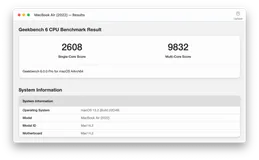
Geekbench 6 is your go-to solution for benchmarking your devices, providing you with detailed insights into their performance. Whether you are gauging CPU power for everyday tasks or testing GPU capabilities for intense gaming, image processing, or video editing, Geekbench 6 has you covered. Experience real-world tests that reflect typical usage scenarios to give you relevant, applicable results.
Geekbench 6's innovative new workloads expand into areas like Augmented Reality and Machine Learning, assuring that your system is ready for the future. Designed for comprehensive cross-platform comparisons, Geekbench 6 supports Android, iOS, macOS, Windows, and Linux. No matter the device or operating system, you can see how your devices stack up against others on the market.
Upload and share your benchmarking results through the Geekbench Browser, keeping all your data organized and easily accessible. Utilize the Benchmark Charts available on the Geekbench Browser to verify device performance using aggregated data from real users in real-world environments. Make informed decisions based on up-to-date information and truly understand your device's capabilities.

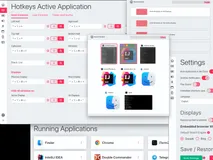
Experience the ultimate window management solution with SMBAct, designed to boost your productivity by simplifying how you interact with multiple windows and applications on your desktop. Take control of your workspace with intuitive keyboard shortcuts, and revel in the ability to cycle through different actions with repeated key presses.
Dive into a world of efficiency with SMBAct's fuzzy search capability, enabling you to swiftly activate or resize windows without the strain of remembering numerous shortcuts. With multi-display support, manage windows across several screens with ease, and keep your focus sharp by utilizing the fast and convenient window switcher feature.
Embed web pages into frameless, always-on-top windows to integrate your web workflow seamlessly into your desktop environment. Plus, take advantage of the blacklist feature to keep certain applications from interruptions while you streamline your multitasking. With a one-time purchase, gain access to all of SMBAct's powerful features, ongoing updates, and dedicated email support.
Don't miss the opportunity to transform the way you work with windows, regardless of whether you're using Windows, macOS, or Linux.

Discover VueScan, the versatile scanning software that turns your obsolete scanner into a high-performance machine. Through state-of-the-art reverse engineering, VueScan liberates over 7400 different scanner models, freeing you from the constraints of discontinued drivers. Download and start scanning in seconds, with easy setup across multiple platforms including Windows and macOS.
Enjoy a suite of advanced features designed to streamline your document handling. Scan, save, and optimize your files with superior color accuracy and detail. Whether archiving a book, digitizing family photos, or preserving precious film and slides, VueScan provides professional-grade results with simplicity and efficiency.
Savor the exceptional value as customers worldwide acclaim its ease-of-use and powerful capabilities, echoing a commitment to quality scanning without the need for frequent upgrades. Embrace VueScan's regular updates and multilingual support, ensuring your scanning needs are always catered for.
With effortless integration into existing workflows and software like Photoshop, VueScan stands as the universal answer to document and image archiving and is lauded for its sustainable approach in extending the life of old scanners.
Imagine a workspace without the clutter of extra keyboards and mice, where transitioning between computers is as effortless as moving your cursor off the edge of the screen. Streamline your multi-device workflows and instantly switch control with a tool designed to enhance productivity and reclaim your desk space.
Security is paramount, so rest assured your sensitive data is protected with TLS/SSL encryption during transmission. Intuitive features like copy and paste across machines, configurable hotkeys, and adaptable screen layouts are all part of the package, enriching your multi-device interaction.
Whether for software development, creative design, education, or gaming, this application is engineered to meet your demanding multi-tasking needs. Empower yourself with a solution trusted by over 2 million users worldwide, including Fortune 500 companies.
Experience the pinnacle of convenience and efficiency with a tool that's always ready, ensuring that every switch is instantaneous, without the lag time that traditional hardware solutions impose.


Designed for ease of use, TablePlus has a friendly and simple GUI. It provides support to a variety of relational databases including MySQL, PostgreSQL, SQLite and many others including some NoSQL databases. Its native build and simple design paired with powerful features enhance the speed and efficiency of database management.
TablePlus allows for fast and easy querying, editing, and management of databases. It has a start-up time of just half a second, ensuring swift operation. In terms of database security, TablePlus scores high with its various security features that include multi-step authentication support, native libssh, and TLS to encrypt connections.
The appearance is customizable to fit the users' personal preferences. The application also boasts of an intuitive spreadsheet-like editor that enables browsing, querying, editing of data, and database structure.
FAQ
What is the cheapest app in this collection?
OpenStickies is the cheapest option at Free tier, $7.49 one-time.
Are there free options in this collection?
Yes. OpenStickies, Geekbench and VueScan offer a free tier, with a one-time upgrade if you need more.
Which platforms does this collection cover?
These apps run on Linux, Mac and Windows.
Do these apps require a subscription?
No. Every app on PayOnceApps is listed because it sells a one-time (perpetual) license. Some also offer a free tier or trial. Prices are checked against the developer's site but can change, so confirm on the app's website before buying.